2024年3月11日星期一

记录一次心态爆炸的瞬间

今天心态真是要爆炸了,两个工作簿,说是要把工作簿1中的F列(大概)复制道工作簿中的E列(大概)。当时我以为是“工作簿1中的A列和工作簿中的A列不一样,工作簿2中有缺少项或增加项,抑或是顺序与工作簿1中的A列不同”于是,天才的我瞬间就想到了用VLOOKUP直接秒了。

于是,我将工作簿1中的表复制到工作簿2,一个VLOOKUP下去,直接报错,不可能呀!于是我稍稍看了一下,好家伙,忘记绝对引用了。加上直接秒了!然后报错,当时大脑都空白了,难道VLOOKUP不是这样用的吗?打开浏览器“VLOOKUP如何使用”——来催,“马上”——搜索下来,玛德我没问题啊,哪里出错了?

回到表格往下一翻,“。。。”,原来表格中间有多余的行,可恶,竟然这样搞,看来一个VLOOKUP不行了,于是开始分段执行函数。哼哼,不过如此,秒了。欸?又报错?——又催,“快了”——再往下翻找,可恶!!工作簿中的F列前面是实际值,后面竟然变成了引用值,我都复制过来了还引用个屁,全没了,啊~心态炸裂。没关系,哥心态良好,转成实际值照样能秒。来到工作簿1,将F列转为实际值后,再次来到工作簿2,重复上列操作,没一会我就发现了一个重大问题“这TM A列有重复值啊,关键E列的值还不一样”然后立马将隐藏的列显示,想着利用B列中的“项目特征描述”增加一个条件直接秒了,再再次来到工作簿1,我是怒从心中起,为啥项目描述还会不一样啊啊啊。这还秒个屁啊,我直接被秒了。

果然,结合以往经验,交给我的任务应该都是繁琐的任务,这次也是不例外,一个一个来吧。“还没好吗?”直接过来看,我就说碰到了些麻烦,“你直接复制过来不就好了”“啊?这两张表格的A列一样吗?”“对啊”那一刻,世界仿佛失去了颜色…

重新下载两个新文件,转实际值,复制粘贴。这就…好了?WTF?一分钟都没到吧这…

总结:这傻吊没脑子吧。我之前的一系列操作全都是基于A列不同的情况下进行的操作,结果到头来,A列是相同的——一字不差。

唉,这次真的是吃了大意的亏,“观而后动”的处事方式我是忘得一干二净,心态炸裂,呵呵,粗心的人没资格心态炸裂,这最多只能叫“傻逼”
2024年3月7日星期四

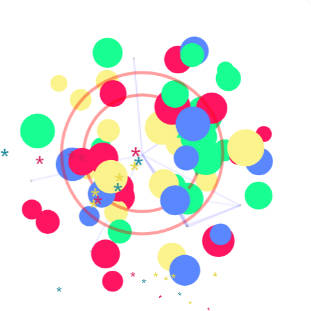
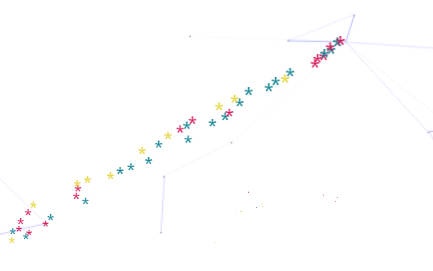
hexo添加鼠标动作效果

  1. 在themes\next\source\js下新建文件夹cursor

  2. 在文件夹cursor下新建两个js文件

    1. cherry.js

      (function cherry() {
          var possibleColors = ["#D61C59", "#E7D84B", "#1B8798"]
          var width = window.innerWidth;
          var height = window.innerHeight;
          var cursor = {x: width/2, y: width/2};
          var particles = [];
          
          function init() {
            bindEvents();
            loop();
          }  
          // Bind events that are needed
          function bindEvents() {
            document.addEventListener('mousemove', onMouseMove);
            document.addEventListener('touchmove', onTouchMove);
            document.addEventListener('touchstart', onTouchMove);
            
            window.addEventListener('resize', onWindowResize);
          }  
          function onWindowResize(e) {
            width = window.innerWidth;
            height = window.innerHeight;
          } 
          function onTouchMove(e) {
            if( e.touches.length > 0 ) {
              for( var i = 0; i < e.touches.length; i++ ) {
                addParticle( e.touches[i].clientX, e.touches[i].clientY, possibleColors[Math.floor(Math.random()*possibleColors.length)]);
              }
            }
          }
          function onMouseMove(e) {    
            cursor.x = e.clientX;
            cursor.y = e.clientY;
            
            addParticle( cursor.x, cursor.y, possibleColors[Math.floor(Math.random()*possibleColors.length)]);
          }
          function addParticle(x, y, color) {
            var particle = new Particle();
            particle.init(x, y, color);
            particles.push(particle);
          }
          function updateParticles() {
            for( var i = 0; i < particles.length; i++ ) {
              particles[i].update();
            }
            for( var i = particles.length -1; i >= 0; i-- ) {
              if( particles[i].lifeSpan < 0 ) {
                particles[i].die();
                particles.splice(i, 1);
              }
            }
          }
          function loop() {
            requestAnimationFrame(loop);
            updateParticles();
          }
          function Particle() {
            this.character = "*";
            this.lifeSpan = 120; //ms
            this.initialStyles ={
              "position": "fixed",
              "top": "0", //必须加
              "display": "block",
              "pointerEvents": "none",
              "z-index": "10000000",
              "fontSize": "20px",
              "will-change": "transform"
            };
            this.init = function(x, y, color) {
              this.velocity = {
                x:  (Math.random() < 0.5 ? -1 : 1) * (Math.random() / 2),
                y: 1
              };
              this.position = {x: x - 10, y: y - 20};
              this.initialStyles.color = color;
              console.log(color);
        
              this.element = document.createElement('span');
              this.element.innerHTML = this.character;
              applyProperties(this.element, this.initialStyles);
              this.update();
              
              document.body.appendChild(this.element);
            };
            this.update = function() {
              this.position.x += this.velocity.x;
              this.position.y += this.velocity.y;
              this.lifeSpan--;
              this.element.style.transform = "translate3d(" + this.position.x + "px," + this.position.y + "px,0) scale(" + (this.lifeSpan / 120) + ")";
            }
            this.die = function() {
              this.element.parentNode.removeChild(this.element);
            }
          }
          function applyProperties( target, properties ) {
            for( var key in properties ) {
              target.style[ key ] = properties[ key ];
            }
          }
          init();
        })();
      
    2. explosion.min.js

      "use strict";
      function updateCoords(e) {
          pointerX = (e.clientX || e.touches[0].clientX) - canvasEl.getBoundingClientRect().left,
          pointerY = e.clientY || e.touches[0].clientY - canvasEl.getBoundingClientRect().top
      }
      function setParticuleDirection(e) {
          var t = anime.random(0, 360) * Math.PI / 180,
          a = anime.random(50, 180),
          n = [ - 1, 1][anime.random(0, 1)] * a;
          return {
              x: e.x + n * Math.cos(t),
              y: e.y + n * Math.sin(t)
          }
      }
      function createParticule(e, t) {
          var a = {};
          return a.x = e,
          a.y = t,
          a.color = colors[anime.random(0, colors.length - 1)],
          a.radius = anime.random(16, 32),
          a.endPos = setParticuleDirection(a),
          a.draw = function() {
              ctx.beginPath(),
              ctx.arc(a.x, a.y, a.radius, 0, 2 * Math.PI, !0),
              ctx.fillStyle = a.color,
              ctx.fill()
          },
          a
      }
      function createCircle(e, t) {
          var a = {};
          return a.x = e,
          a.y = t,
          a.color = "#F00",
          a.radius = 0.1,
          a.alpha = 0.5,
          a.lineWidth = 6,
          a.draw = function() {
              ctx.globalAlpha = a.alpha,
              ctx.beginPath(),
              ctx.arc(a.x, a.y, a.radius, 0, 2 * Math.PI, !0),
              ctx.lineWidth = a.lineWidth,
              ctx.strokeStyle = a.color,
              ctx.stroke(),
              ctx.globalAlpha = 1
          },
          a
      }
      function renderParticule(e) {
          for (var t = 0; t < e.animatables.length; t++) {
              e.animatables[t].target.draw()
          }
      }
      function animateParticules(e, t) {
          for (var a = createCircle(e, t), n = [], i = 0; i < numberOfParticules; i++) {
              n.push(createParticule(e, t))
          }
          anime.timeline().add({
              targets: n,
              x: function(e) {
                  return e.endPos.x
              },
              y: function(e) {
                  return e.endPos.y
              },
              radius: 0.1,
              duration: anime.random(1200, 1800),
              easing: "easeOutExpo",
              update: renderParticule
          }).add({
              targets: a,
              radius: anime.random(80, 160),
              lineWidth: 0,
              alpha: {
                  value: 0,
                  easing: "linear",
                  duration: anime.random(600, 800)
              },
              duration: anime.random(1200, 1800),
              easing: "easeOutExpo",
              update: renderParticule,
              offset: 0
          })
      }
      function debounce(e, t) {
          var a;
          return function() {
              var n = this,
              i = arguments;
              clearTimeout(a),
              a = setTimeout(function() {
                  e.apply(n, i)
              },
              t)
          }
      }
      var canvasEl = document.querySelector(".fireworks");
      if (canvasEl) {
          var ctx = canvasEl.getContext("2d"),
          numberOfParticules = 30,
          pointerX = 0,
          pointerY = 0,
          tap = "mousedown",
          colors = ["#FF1461", "#18FF92", "#5A87FF", "#FBF38C"],
          setCanvasSize = debounce(function() {
              canvasEl.width = 2 * window.innerWidth,
              canvasEl.height = 2 * window.innerHeight,
              canvasEl.style.width = window.innerWidth + "px",
              canvasEl.style.height = window.innerHeight + "px",
              canvasEl.getContext("2d").scale(2, 2)
          },
          500),
          render = anime({
              duration: 1 / 0,
              update: function() {
                  ctx.clearRect(0, 0, canvasEl.width, canvasEl.height)
              }
          });
          document.addEventListener(tap,
          function(e) {
              "sidebar" !== e.target.id && "toggle-sidebar" !== e.target.id && "A" !== e.target.nodeName && "IMG" !== e.target.nodeName && (render.play(), updateCoords(e), animateParticules(pointerX, pointerY))
          },
          !1),
          setCanvasSize(),
          window.addEventListener("resize", setCanvasSize, !1)
      }
      "use strict";
      function updateCoords(e) {
          pointerX = (e.clientX || e.touches[0].clientX) - canvasEl.getBoundingClientRect().left,
          pointerY = e.clientY || e.touches[0].clientY - canvasEl.getBoundingClientRect().top
      }
      function setParticuleDirection(e) {
          var t = anime.random(0, 360) * Math.PI / 180,
          a = anime.random(50, 180),
          n = [ - 1, 1][anime.random(0, 1)] * a;
          return {
              x: e.x + n * Math.cos(t),
              y: e.y + n * Math.sin(t)
          }
      }
      function createParticule(e, t) {
          var a = {};
          return a.x = e,
          a.y = t,
          a.color = colors[anime.random(0, colors.length - 1)],
          a.radius = anime.random(16, 32),
          a.endPos = setParticuleDirection(a),
          a.draw = function() {
              ctx.beginPath(),
              ctx.arc(a.x, a.y, a.radius, 0, 2 * Math.PI, !0),
              ctx.fillStyle = a.color,
              ctx.fill()
          },
          a
      }
      function createCircle(e, t) {
          var a = {};
          return a.x = e,
          a.y = t,
          a.color = "#F00",
          a.radius = 0.1,
          a.alpha = 0.5,
          a.lineWidth = 6,
          a.draw = function() {
              ctx.globalAlpha = a.alpha,
              ctx.beginPath(),
              ctx.arc(a.x, a.y, a.radius, 0, 2 * Math.PI, !0),
              ctx.lineWidth = a.lineWidth,
              ctx.strokeStyle = a.color,
              ctx.stroke(),
              ctx.globalAlpha = 1
          },
          a
      }
      function renderParticule(e) {
          for (var t = 0; t < e.animatables.length; t++) {
              e.animatables[t].target.draw()
          }
      }
      function animateParticules(e, t) {
          for (var a = createCircle(e, t), n = [], i = 0; i < numberOfParticules; i++) {
              n.push(createParticule(e, t))
          }
          anime.timeline().add({
              targets: n,
              x: function(e) {
                  return e.endPos.x
              },
              y: function(e) {
                  return e.endPos.y
              },
              radius: 0.1,
              duration: anime.random(1200, 1800),
              easing: "easeOutExpo",
              update: renderParticule
          }).add({
              targets: a,
              radius: anime.random(80, 160),
              lineWidth: 0,
              alpha: {
                  value: 0,
                  easing: "linear",
                  duration: anime.random(600, 800)
              },
              duration: anime.random(1200, 1800),
              easing: "easeOutExpo",
              update: renderParticule,
              offset: 0
          })
      }
      function debounce(e, t) {
          var a;
          return function() {
              var n = this,
              i = arguments;
              clearTimeout(a),
              a = setTimeout(function() {
                  e.apply(n, i)
              },
              t)
          }
      }
      var canvasEl = document.querySelector(".fireworks");
      if (canvasEl) {
          var ctx = canvasEl.getContext("2d"),
          numberOfParticules = 30,
          pointerX = 0,
          pointerY = 0,
          tap = "mousedown",
          colors = ["#FF1461", "#18FF92", "#5A87FF", "#FBF38C"],
          setCanvasSize = debounce(function() {
              canvasEl.width = 2 * window.innerWidth,
              canvasEl.height = 2 * window.innerHeight,
              canvasEl.style.width = window.innerWidth + "px",
              canvasEl.style.height = window.innerHeight + "px",
              canvasEl.getContext("2d").scale(2, 2)
          },
          500),
          render = anime({
              duration: 1 / 0,
              update: function() {
                  ctx.clearRect(0, 0, canvasEl.width, canvasEl.height)
              }
          });
          document.addEventListener(tap,
          function(e) {
              "sidebar" !== e.target.id && "toggle-sidebar" !== e.target.id && "A" !== e.target.nodeName && "IMG" !== e.target.nodeName && (render.play(), updateCoords(e), animateParticules(pointerX, pointerY))
          },
          !1),
          setCanvasSize(),
          window.addEventListener("resize", setCanvasSize, !1)
      };
      
  3. 在themes\next\layout下新建文件夹_custom

  4. 在新建文件夹_custom下新建一个custom.swig文件

    [%- if theme.cursor_effect %]
      [%- if theme.cursor_effect.type == "explosion" %]
        <canvas class="fireworks" style="position: fixed;left: 0;top: 0;z-index: 1; pointer-events: none;" ></canvas>
        <script src="//cdn.bootcss.com/animejs/2.2.0/anime.min.js"></script>
        <script src="/js/cursor/explosion.min.js"></script>
      [%- elseif theme.cursor_effect.type == "cherry" %]
        <script src="/js/cursor/cherry.js"></script>
      [%- endif %]
    [%- endif %]
    
    
  5. 在themes\next\layout下的_layout.swig文件中添加以下代码

    {% include '_custom/custom.swig' %}
    
  6. 在themes\next_config.yml中添加以下代码

    # cherry: 樱花 | explosion:爆炸 
    cursor_effect:
      enabled: true
      type: cherry 
    
  7. 大功告成

2024年2月3日星期六

2的次方表

本表记录了 2 的一次方到 2 的 64 次方的值,其中 2¹ - 2¹⁰ 应记忆

常用

单位
K 10³
M 10⁶
G 10⁹
T 10¹²
P 10¹⁵
E 10¹⁸

不常用

1 2
2 4
3 8
4 16
5 32
6 64
7 128
8 256
9 512
10 1024
11 2048
12 4096
13 8192
14 16384
15 32768
16 65536
17 131072
18 262144
19 524288
20 1048576
21 2097152
22 4194304
23 8388608
24 16777216
25 33554432
26 67108864
27 134217728
28 268435456
29 536870912
30 1073741824
31 2147483648
32 4294967296
33 8589934592
34 17179869184
35 34359738368
36 68719476736
37 137438953472
38 274877906944
39 549755813888
40 1099511627776
41 2199023255552
42 4398046511104
43 8796093022208
44 17592186044416
45 35184372088832
46 70368744177664
47 140737488355328
48 281474976710656
49 562949953421312
50 1125899906842624
51 2251799813685248
52 4503599627370496
53 9007199254740992
54 18014398509481984
55 36028797018963970
56 72057594037927940
57 144115188075855870
58 288230376151711740
59 576460752303423500
60 1152921504606847000
61 2305843009213694000
62 4611686018427388000
63 9223372036854776000
64 18446744073709552000

自体防御系统故障报告

夜静风清 犬吠空庭 君子何往 死月独行 一潦西流水 已巳 七月 廿三 于沪